Voice messages for marathon runners: the apps compared (Cobbr, Rally, CheerMyRun and more)
Which voice message app should you use for your marathon? Mile-triggered or live, what supporters need to do, tracking and pricing: Cobbr, Rally, CheerMyRun, Hollarhype and Back My Run compared.
Voice messages for marathon runners are short recordings from friends and family that play in your headphones during the race. Apps fall into two groups: those that play pre-recorded messages at a chosen kilometre or mile (Cobbr, Rally, Back My Run), and those that send voice notes live while you run (Hollarhype, CheerMyRun). Cobbr does both from a single supporter link. Cobbr is our app, so here is what each option actually offers, to help you pick the one that suits you.
How do voice message apps for runners work?
The idea is almost always the same. You install the app, pick or create your race, then share a link with family and friends. They record their message on their phone. On race day, the app uses your phone's GPS to know where you are and plays the messages in your headphones, lowering or pausing your music while they play.
What changes from one app to another:
- The trigger: at a kilometre or mile chosen in advance, or as soon as the message is sent, live.
- What supporters have to do: open a simple link in their browser, or install the app and create an account.
- Tracking: some apps also show supporters your live position.
- Pricing: they're all free to download, but the core features often sit behind an in-app purchase or subscription.
Mile-triggered or live voice notes: what's the difference?
Distance-triggered messages are recorded before the race. Your sister picks kilometre 30, your coach picks kilometre 5, and you know someone is waiting for you at those points. It's ideal for supporters who can't follow the race live, or who prefer to record calmly.
Live messages are sent during the race. Someone following your progress can react the moment they see you slowing down. It's more spontaneous, but they need to be available while you run.
The two work well together: scheduled messages for the tough sections you know about, live ones for the unexpected.
Voice message apps for runners compared
The details below come from each app's official store listing (App Store, Google Play) and website.
Cobbr
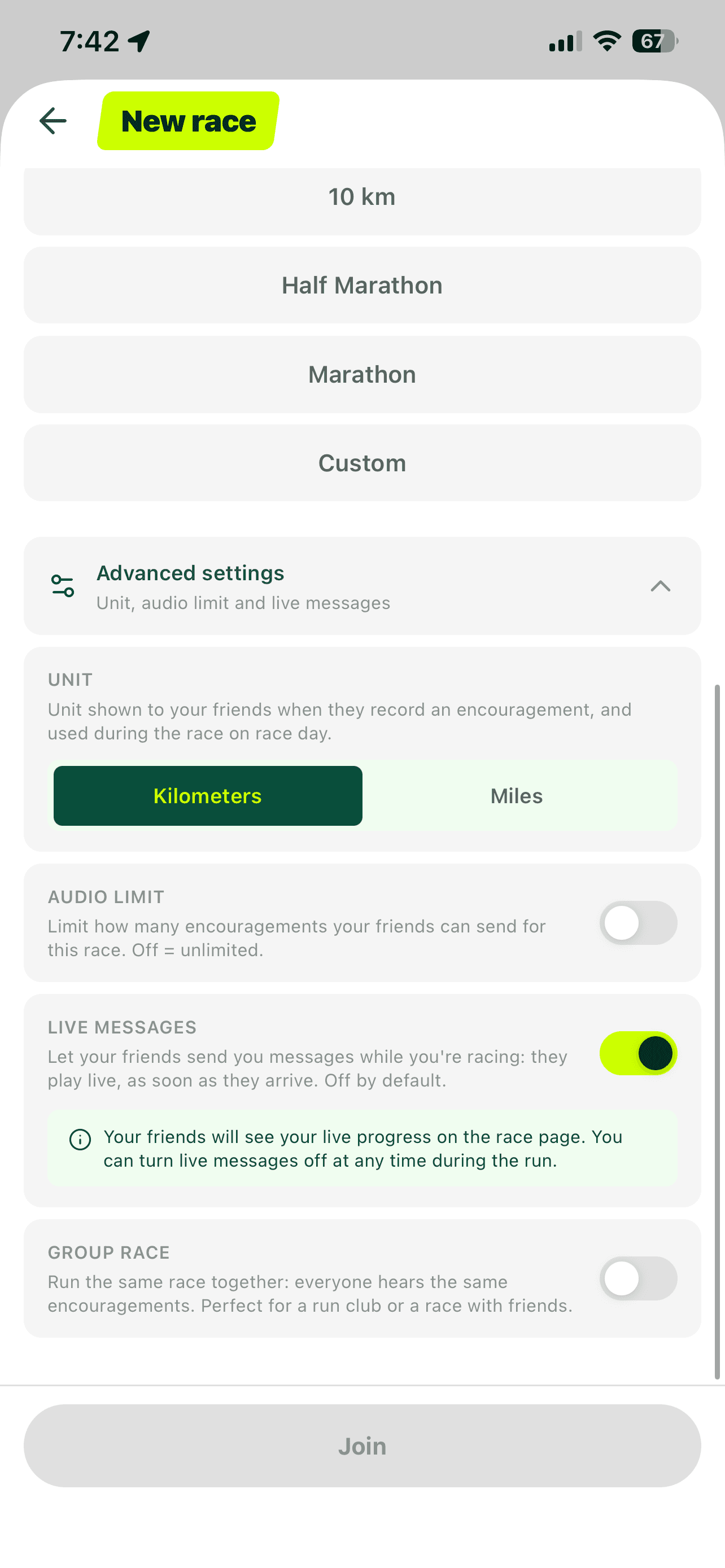
- Trigger: at the kilometre each supporter chooses, using your phone's GPS, plus live messages if you turn on the "Live messages" option.
- For supporters: a web link, nothing to install, recording in the browser.
- Messages: unlimited, up to 30 seconds each; you can replay them after the race.
- Tracking: with live messages on, supporters see your progress on the race page; you can switch live messages off at any time.
- Races: any distance from 5K to ultra, official races or your own runs.
- Platforms: iPhone and Android. Free download with an in-app purchase.
Rally: Voice Notes on Race Day
- Trigger: messages play automatically at each mile your supporters choose, using GPS.
- For supporters: recording in the browser, no app needed.
- Tracking: real-time location tracking during races.
- Races: events in the US, Canada, Europe and Australia, from 5K to marathon; the app works with races that have mile markers.
- Platforms: iPhone and Android. Free download with in-app purchases (race packs).
CheerMyRun
- Trigger: supporters follow your run live on a map and send a voice message while you run.
- For supporters: one link, no download or account.
- Tracking: live GPS tracking with pace, distance and time; automatic transcription of cheers.
- Races: training runs and races, 5K to ultra, custom distances.
- Platforms: iPhone and Android. Free download; a weekly, monthly or annual subscription unlocks unlimited runs and cheers.
Hollarhype
- Trigger: live only. You "go live", your groups get a notification and send voice notes that play over your music.
- For supporters: they join your group through the app.
- Races: not limited to running or race day; it works for training, cycling or the gym.
- Platforms: iPhone and Android. Free download.
Back My Run
- Trigger: pre-recorded messages played at key milestones, using GPS.
- For supporters: recording in the browser, no app or account.
- Other: works offline during the race, messages can be downloaded afterwards.
- Platforms: iPhone and Android. Free download; per-race packages or a monthly subscription.
What about tracking apps?
RaceJoy and Follow My Sport are tracking apps first. RaceJoy lets spectators send pre-recorded audio cheers or Text-to-Cheer messages, but both runner and spectator need the app. Follow My Sport has a private Fan Zone where supporters leave text, audio, photo and video cheers alongside GPS tracking. As for Cheer Everywhere, which often comes up on forums, it isn't an app: it's a crowd-support group based around New York that publishes a guide to cheering well.
If what you really want is to know where a runner is, read our guide on how to track a runner during a race.
Which app should you choose?
- You want messages planned along the whole course, with nothing for supporters to install: Cobbr, Rally or Back My Run.
- You also want live messages without juggling links: Cobbr, which combines distance-triggered and live messages on the same link.
- Your supporters mainly want to follow your position on a map: CheerMyRun, or your race's official tracking app.
- You want live voice notes every day, not just on race day: Hollarhype.
- You race in kilometres: check that the app handles kilometres, not just miles. Cobbr works in kilometres or miles.
How to set up your voice messages
The hard part isn't the app, it's getting people to record. Send the link one or two weeks before, with a simple ask: "Pick a kilometre and tell me something, 20 seconds is plenty." Send a reminder three days out.

For a marathon, aim for messages at the key moments: one at the start to calm you down, one at halfway, several between kilometres 28 and 35, where many runners hit the wall, and one in the final kilometre. Our encouragement messages for runners give examples for each moment, and our article on live messages explains how to turn the option on in Cobbr.
If you're racing far from home or with nobody on the course, these messages matter even more, as we explain in running a marathon alone. For an example message plan on a real course, see our Dublin Marathon guide.
To try it, download Cobbr from the home page and follow the guide to set up your first race.
FAQ
What is the best voice message app for a marathon?
It depends on what you want. For distance-triggered messages with nothing for supporters to install: Cobbr, Rally or Back My Run. For live-only voice notes: Hollarhype. To combine both on one link: Cobbr.
Do my supporters need to download the app?
Not with Cobbr, Rally, CheerMyRun or Back My Run: a browser link is enough. With Hollarhype and RaceJoy, they use the app.
Can I listen to music at the same time?
Yes, these apps are built for that: the voice message plays over your music or podcast, then playback resumes.
How long can a voice message be?
On Cobbr, up to 30 seconds per message, with no limit on the number of messages. Ten to twenty seconds works best mid-race.
Do these apps work in kilometres?
Cobbr works in kilometres or miles. Rally is built around mile markers, so check its listing before using it for a race measured in kilometres.
Cover photo: Shixart1985 / Wikimedia Commons, licence CC BY 2.0.